XF Language Header Editor v1.0 Download
What is the XF Language Header Editor?
The XF Language Header Editor is a specialized Windows application designed to simplify the management of XF-format MIDI files. This powerful tool enables bulk editing of metadata across multiple MIDI files simultaneously, saving countless hours of manual work for musicians, producers, and MIDI enthusiasts.
Key Benefits:
- Edit multiple MIDI files in batch operations
- Modify composer, performer, copyright, and language information
- Preserve specific data fields while editing others
- Visual progress tracking for large operations
- Intuitive interface requiring no technical expertise
Whether you're standardizing your MIDI library, correcting metadata, or preparing files for distribution, the XF Language Header Editor streamlines the process with precision and efficiency.
Understanding the XF Format
The XF Format (Extended Format) is an official extension of the Standard MIDI File (SMF) format, defined as MIDI RP-001 (Recommended Practice). Developed to enhance the capabilities of MIDI files, XF format provides several advantages:
XF Format Features:
- Enhanced Compressibility: Better data compression for smaller file sizes
- Interactive Capabilities: Support for interactive music applications
- Upward Compatibility: Maintains compatibility with existing SMF data
- Extended Metadata: Rich header information including language support
- Yamaha Integration: Native support in Yamaha keyboards and sound modules
This format is widely used in professional music production, educational materials, and commercial MIDI content, making proper management of XF headers essential for organized music libraries.
Application Interface
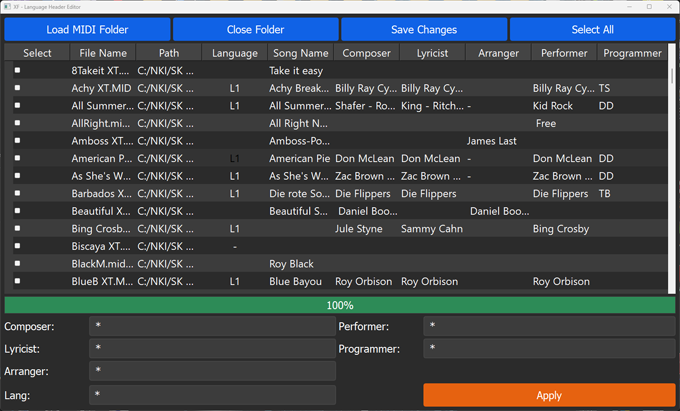
The clean, organized interface displays all XF header information in an easy-to-edit table format with bulk operation controls.
Comprehensive Editing Features
The XF Language Header Editor provides extensive control over XF file metadata with these powerful features:
Editing Capabilities:
- Bulk Folder Processing: Load entire folders of MIDI files for simultaneous editing
- Individual Field Editing: Double-click any field to modify its content directly
- Selective Preservation: Use the
*symbol to protect specific columns from changes - Progress Visualization: Real-time progress bar shows operation status for large batches
- Flexible Selection: Choose individual files, select all, or use custom selection patterns
- One-Click Application: Apply all changes across selected files with a single button
Practical Usage Examples
Here are common scenarios where the XF Language Header Editor proves invaluable:
Library Standardization
When consolidating MIDI collections from multiple sources, standardize composer and copyright information across all files to create a consistent, professional library.
Copyright Updates
Update copyright information across your entire MIDI collection when licensing changes or to add proper attribution for purchased content.
Performance Preparation
Prepare sets for live performances by updating performer information and adding specific language headers for international audiences.
Educational Materials
Educators can efficiently update composer and program information across teaching materials and exercise files.
Step-by-Step Usage Guide
Step 1: Open a Folder
Launch the application and load a folder containing your XF-format MIDI files. The application will automatically scan and display all compatible files with their current header information.
Step 2: Edit Individual Fields
Double-click on any field in the display table to modify its content. This allows for precise, targeted edits to specific files or fields.
Step 3: Apply Bulk Changes
Use the bulk editing section to apply changes across multiple files simultaneously. You can:
- Manually select specific rows using checkboxes
- Use the "Select All" option for entire folder operations
- Apply the same value to all selected files
Step 4: Selective Editing with Asterisk
Use the * symbol strategically to preserve specific data while editing other fields:
Composer: *
Performer: *
Programmer: [Your Name]
Copyright: *
Step 5: Save Changes
Click the "Apply" button to save all your edits. The progress bar will display the operation status, and you'll receive confirmation when all changes are complete.
Step 6: Close and Continue
After completing your edits, close the current folder to open another one or exit the application. Your changes are permanently saved to the MIDI files.
Important Usage Notes
- Always Backup Your Files: Create a backup of your MIDI files before using the software to prevent accidental data loss.
- Asterisk Preservation Method: Use the
*symbol in bulk editing fields to avoid making changes to specific columns. This is essential for targeted edits. - File Compatibility: The editor works specifically with XF-format MIDI files. Standard MIDI files without XF extensions may not display all editable fields.
- Undo Functionality: The application does not include an undo feature, making backups especially important.
- Large Collections: The progress bar provides visual feedback when processing folders with many files, ensuring you can monitor lengthy operations.
Why Choose the XF Language Header Editor?
This specialized tool addresses a critical need in the MIDI community - efficient management of XF format metadata. Unlike generic file editors or manual methods, the XF Language Header Editor understands the specific structure of XF files and provides targeted editing capabilities that save significant time and reduce errors.
For professional musicians maintaining large libraries, educators organizing teaching materials, or enthusiasts managing personal collections, this tool transforms a tedious manual process into a quick, efficient operation. The ability to make consistent changes across entire folders ensures metadata accuracy and library organization that would be impractical to achieve manually.
By choosing the XF Language Header Editor, you're investing in workflow efficiency and the long-term organization of your valuable MIDI collection.