What is the INS File Generator?
The INS File Generator is a specialized tool designed to simplify the process of creating Cakewalk Instrument Definition files for Yamaha keyboards. These INS files are essential for proper DAW integration, allowing you to access all available voices and sounds directly from your digital audio workstation.
Key Benefits:
- Automatically convert CSV voice lists to INS format
- Eliminate manual entry of MSB, LSB, and PC bank values
- Optimized for modern Yamaha PSR-SX and Genos keyboards
- Save hours of tedious manual configuration
- Ensure accurate voice mapping in your DAW projects
Compatibility Information
While the INS File Generator is specifically optimized for modern Yamaha PSR-SX and Genos 2 keyboards, it maintains compatibility with a wide range of Yamaha models:
- Primary Support:
- PSR-SX900 / SX700
- PSR-SX920 / SX720
- Genos 2
- Genos
- Extended Compatibility:
- Tyros 5, Tyros 4, Tyros 3
- Tyros 2, Tyros 1
- Legacy PSR and PSR-S models
- DGX and CVP series
Note: Official XLSX voice lists are primarily provided for PSR-SX and Genos 2 models. For older keyboards, you may need to manually compile the voice list data.
This tool is exclusively designed for Yamaha keyboards and is not intended for use with instruments from other manufacturers.
Application Interface
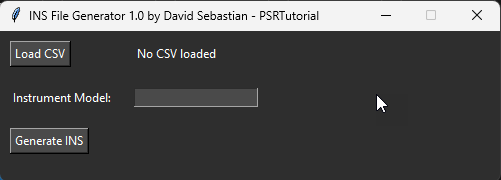
The clean, intuitive interface makes generating INS files straightforward with just a few clicks.
How to Use the INS File Generator
Step 1: Download the Data List
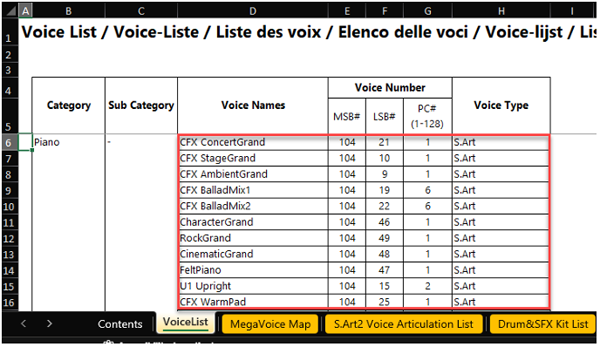
Obtain the official Data List for your Yamaha keyboard from Yamaha's website. This document contains the complete voice list with all necessary bank select information.
Step 2: Prepare the Excel File
Copy the VoiceList tab from the data list into a new Excel document. Ensure you include the proper headers: Voice Name, MSB, LSB, PC, and Type as shown below.
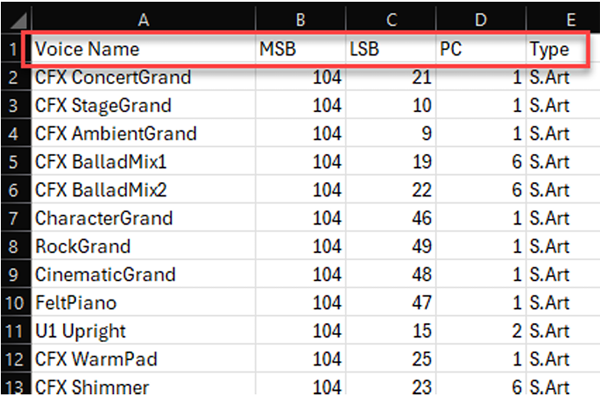
These headers are essential for the tool to correctly parse the voice information and generate accurate INS files.
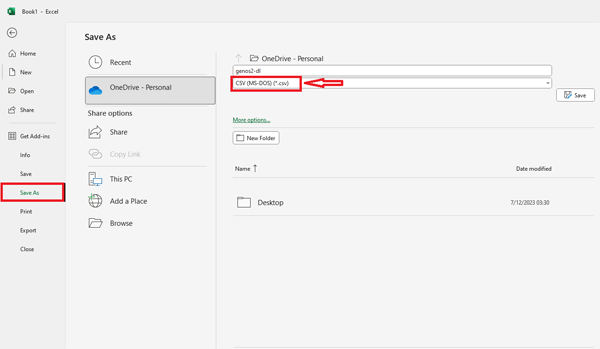
Step 3: Save as CSV Format
Save your prepared Excel file in CSV (Comma Separated Values) format. This creates a plain text file that the INS File Generator can process.
Step 4: Load CSV File in the Application
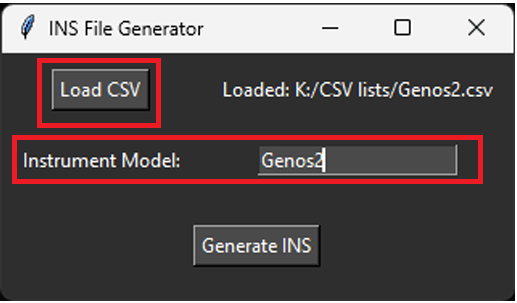
Launch the INS File Generator and click the "Load" button to select your prepared CSV file. Enter your specific keyboard model (e.g., "Genos2" or "PSR-SX900") in the "Instrument Model" field.
Step 5: Generate Your INS File
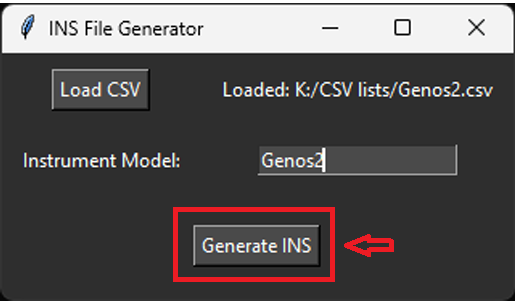
Click the "Generate INS" button to create your instrument definition file. The application will process the CSV data and create a properly formatted INS file ready for use in Cakewalk by BandLab.
Once generated, you can import this INS file into Cakewalk to have full access to all your keyboard's voices directly from your DAW.