Yamaha Playlist Manager v1.0.16
Current Version: v1.0.16
Windows ▶ Download YamahaPlaylistManager_v1.0.16.zip ◀
MacOS ▶ Download YamahaPlaylistManager_v1.0.16_MacOS.zip ◀
Yamaha Playlist Manager – Streamline Your Registration Bank Playlists
YPM - Yamaha Playlist Manager is a specialized desktop application built to simplify and centralize the handling of registration bank playlists for Yamaha keyboards such as Genos and PSR-SX series. Formerly known as “Genos Playlist Worker,” the tool evolved when support extended to newer models. Its design focuses on batch operations, intuitive editing, and flexible organization of playlists.
Application Interface
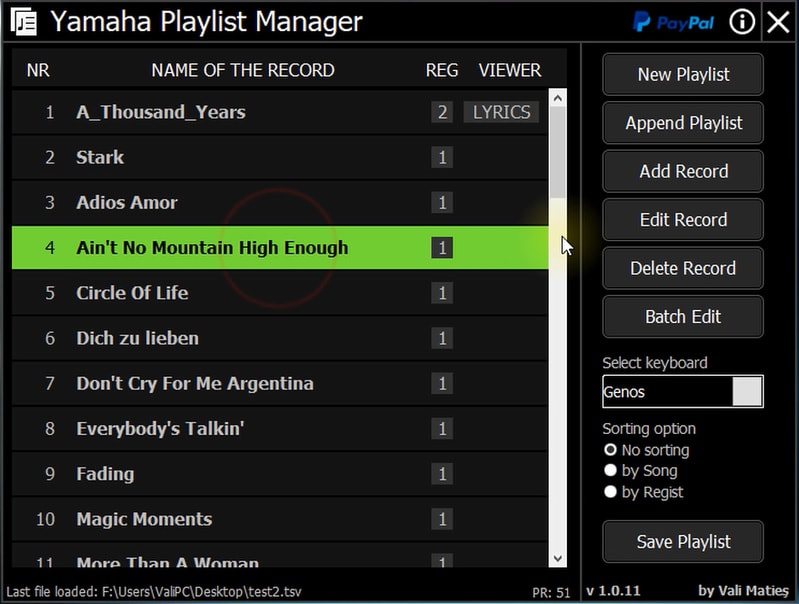
Core Features & Workflow
Import and Add Records Easily
- Import playlist records by selecting alphabetic groups (A-Z) or bring in all records in one go.
- Add new records directly from your PC, then assign them to registration banks using a Genos-style interface.
- When loading from a folder of registration banks, you can multi-select entries (using CTRL) to include several at once.
Edit, Delete, and Refine Entries
- Delete or adjust existing records with minimal effort.
- Rearrange playlists by sorting them either by the custom “Song Name” field or by the registration bank file name.
- Use Batch Edit to apply changes globally, for example: shifting file paths or editing lyrics/text fields across multiple entries.
Path Management & Memory Persistence
- Modify file paths of all entries in bulk to accommodate changes in folder structure or storage locations.
- The application remembers the last folder used for registration banks and opens there by default next time; when the app closes, it resets to its default installation path.
- For workflow consistency, the software stores recent access paths so you don’t have to navigate afresh every time.
Lightweight & Java-Based
- Yamaha Playlist Manager requires Java Runtime Environment (JRE) version 1.8 or newer to run.
- If the app fails to launch under typical installation paths, you can embed a jre subfolder next to the executable containing the bin and lib folders, or set the JAVA_HOME environment variable to point at your JRE location.
- The tool is a single executable file, reducing installation overhead.
Update & Compatibility Notes
- The built-in update mechanism helps you fetch newer versions via a link that opens in your default browser, so your browser handles the download.
- The update notice appears in green text at the bottom of the main screen when a newer version is detected.
- On macOS, a version tested for High Sierra is also available.
- The development remains a personal side project, so support is light but active via updates and user feedback.
How to Update Yamaha Playlist Manager
When a new version is available, a green update message appears at the bottom of the app. Click it, and your browser will open the download page. If that doesn’t work, you can always download the latest version directly from the official website or on the PSR Tutorial website.
Why Use Yamaha Playlist Manager?
If you work with complex song libraries and registration banks across multiple folders and devices, managing them can become time consuming and error prone. Yamaha Playlist Manager addresses this by consolidating tasks such as import, sorting, editing, path relocation, and batch updates into one intuitive interface. Rather than toggling between file explorers, text editors, and multiple windows, you can handle large libraries with fewer clicks and lower risk of mistakes.
Because the tool is Java-based and lightweight, it runs well on many Windows machines (and has macOS support) without requiring heavy resource usage.
Version News
Current v1.0.16
- MacOS version was released.
Note: Tests was made on MacOS Monterey (12.0.1). If you have a different version of MacOS and this app does not starts, or raise errors, please write on PSRTutorial.com forum. I will look for solutions.
Later edit: Tested on macOS Sequoia and Tahoe (26.0), by following the notes bellow, in macOS chapter, you will be able to launch and use on the latest version of macOS, too.
- Loading of versions history file was moved to application resources, no need for an active internet connection to see the version history.
- Resolved issues in the Append Playlist operation: previously, playlists containing empty lines were not handled correctly during parsing.
Attention! Knowing issue: When loading a playlist containing records that start with digits or diacritics, only manual selection is available for these records on the preloading screen.
- Code refactoring and core reorganization for improved maintainability of both Windows and MacOS versions.