Style OTS Replacer v1.0.6
Current Version: v1.0.6
What is Style OTS Replacer
Style OTS Replacer is a Windows program designed for Yamaha arranger keyboards that simplifies the way you manage One Touch Settings in style files. Instead of editing each style manually, you can copy OTS slots from a single source style and apply them to many target styles at once. This saves time, keeps your performance setup consistent, and helps you organize your style library more effectively.
Application Interface
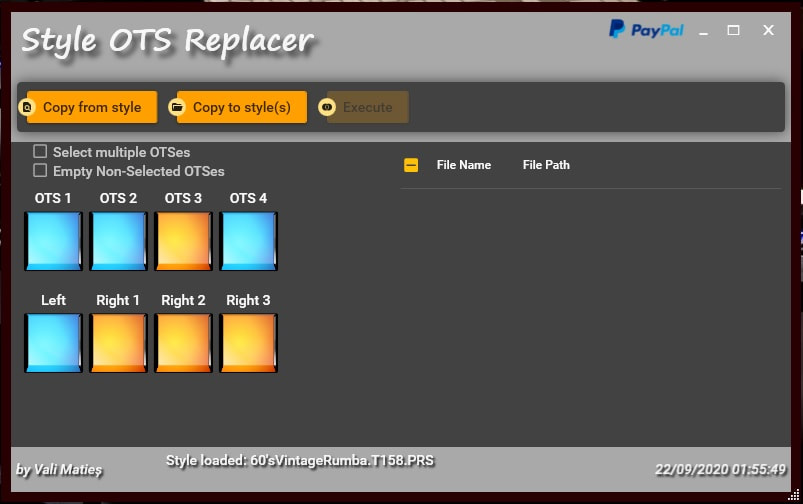
Features
Batch Copy OTS Data
Choose one style as the source, select the OTS slots you want, and copy them into multiple target styles in one step. Whether you want to update a few styles or hundreds, the process takes only seconds.
Visual OTS Slot Preview
Each OTS slot is displayed with clear color indicators, making it easy to see which parts contain data. You can quickly view voice information for Left, Right1, Right2, and Right3 parts before applying changes.
Flexible Selection Options
Mark individual target styles or use the master checkbox to select all styles in the chosen folder. You can also choose to empty non-selected OTS slots in target files, giving you full control over the final result.
Voice Conversion Support
With a conversion data file, you can automatically replace or rename voices during copying. The software reads GM, GM2, XG, and Genos2 voice tables, ensuring compatibility across many Yamaha models. If a voice cannot be identified, it will be shown as “Unknown voice,” so you always know what has been applied.
Repair and Compatibility Functions
The program automatically detects broken or missing OTS sections in styles. When possible, it creates valid empty OTS slots so that copying can continue smoothly. This makes the tool useful for both old and new Yamaha styles.
System Requirements
Style OTS Replacer works on Windows 7 and newer systems. Depending on your computer, you should install either the x86 version for 32-bit systems or the x64 version for 64-bit systems. The program may also require .NET Desktop Runtime to be installed. If it fails to start, installing the Microsoft KB4457144 update often resolves the issue.
Why Use Style OTS Replacer
For Yamaha keyboard players, setting up styles with the right One Touch Settings can take a lot of time. This tool makes the process efficient and consistent by letting you copy OTS slots in bulk. Whether you are preparing for live performance, organizing your personal library, or creating custom packs, Style OTS Replacer gives you a faster and easier way to manage your style collection.
Donation and Support
The program is maintained by its developer in spare time. It is free to use, but if you find it helpful, you can support future development with a small donation via PayPal directly from within the software.